Select Version of EA Desktop:
The license status indicates the progress of a license.
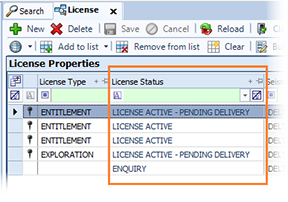
The status of a license displays in the License Status column of the License Properties grid.
You can use the search option to search all licenses, or according to status.
To use the status search, click search next to License and click a status category to open the search window.
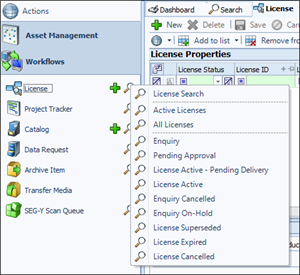
The statuses available for the working phase of a license include:
-
Enquiry: This is the initial status for a newly created license. The sales associate is collecting information and specifying the license details, monitoring tasks and generating the required documentation. After entering all required information, the license is ready for the Pending Approval status.
-
Pending Approval: At this stage, the user generates and sends a proposal and license agreement to the client for approval. If the client does not approve the license agreement, you can recall the license back to the Enquiry status to modify the information.After the client approves the license agreement, change the license status to License Active - Pending Delivery
-
License Active - Pending Delivery: The client has reviewed and approved the license agreement. Details have transferred to a Data Request for preparation.
-
License Active: Client has received the data.
Aside from the typical working statuses, the License module includes several alternative end-case statuses:
- Enquiry Cancelled: Cancelled, information saved.
- Enquiry On-Hold: On hold with the option to progress in the future.
- License Superseded: License has been replaced.
- License Expired: Expiration date has passed, if expiry was set.
- License Cancelled: License has been cancelled.
To change a license status, refer to Updating a license status.
The license status indicates the progress of a license.
The status of a license displays in the License Status column of the License Properties grid.
You can use the search option to search all licenses, or according to status.
To use the status search, click search next to License and click a status category to open the search window.
The statuses available for the working phase of a license include:
-
Enquiry: This is the initial status for a newly created license. The sales associate is collecting information and specifying the license details, monitoring tasks and generating the required documentation. After entering all required information, the license is ready for the Pending Approval status.
-
Pending Approval: At this stage, the user generates and sends a proposal and license agreement to the client for approval. If the client does not approve the license agreement, you can recall the license back to the Enquiry status to modify the information.After the client approves the license agreement, change the license status to License Active - Pending Delivery
-
License Active - Pending Delivery: The client has reviewed and approved the license agreement. Details have transferred to a Data Request for preparation.
-
License Active: Client has received the data.
Aside from the typical working statuses, the License module includes several alternative end-case statuses:
- Enquiry Cancelled: Cancelled, information saved.
- Enquiry On-Hold: On hold with the option to progress in the future.
- License Superseded: License has been replaced.
- License Expired: Expiration date has passed, if expiry was set.
- License Cancelled: License has been cancelled.
To change a license status, refer to Updating a license status.